Hand Drawn Design Elements for Creative Projects
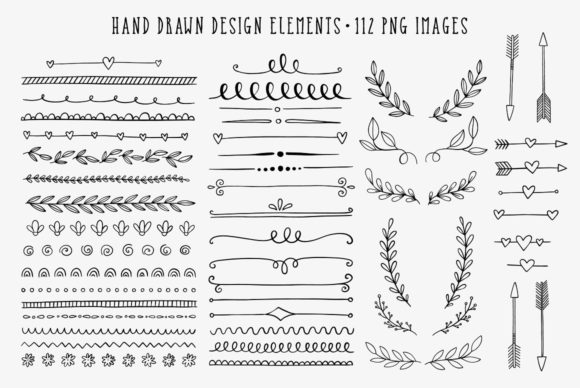
Hand Drawn Design Elements offer a charming, versatile way to elevate your creative work. Whether you're designing a wedding invitation, crafting a blog layout, or putting together a handmade greeting card, these elements bring a personal, artistic touch that digital graphics often miss. This set includes 112 high-quality design assets—56 in black and 56 in white—each saved as a PNG file with a transparent background. They're ideal for both light and dark backgrounds, giving you flexibility across a wide range of projects.
What Makes These Design Elements Unique?
Each item in this collection is created by hand, giving them a natural, organic feel. Unlike rigid vector graphics, hand-drawn elements have subtle imperfections that add warmth and authenticity. The set includes frames, borders, banners, and ribbons—all sized to fit a variety of design needs. With a resolution of 300 dpi and widths ranging from 12 to 30 inches at their widest points, they're crisp and clear whether used in print or digital formats.
Why Use Hand Drawn Elements in Your Designs?
If you're looking to add personality and a human touch to your work, these design elements are perfect. They help break the monotony of clean, digital layouts and introduce a sense of craftsmanship. Whether you're a beginner or an experienced designer, incorporating these graphics can help your projects stand out without requiring advanced design skills.
Common Uses for Hand Drawn Design Elements
- Wedding invitations: Use elegant hand-drawn borders or banners to frame your text and create a soft, romantic look.
- Greeting cards: Add a playful frame or ribbon to highlight a handwritten message or photo.
- Blog graphics: Enhance your blog posts with subtle borders or decorative accents that match your brand's tone.
- Scrapbooking: Layer ribbons and frames to create a dynamic, personalized layout for your memories.
- Craft projects: Print and cut out elements to embellish handmade cards, planners, or gift tags.
Who Can Benefit from This Design Set?
This collection is perfect for a wide range of users. Beginners can easily drag and drop these graphics into design tools like Canva or Photoshop without needing advanced skills. Hobbyists and crafters can use them in both digital and printed formats. Entrepreneurs and small business owners may find them useful for branding materials, social media graphics, or product packaging. Educators can also use these elements to create visually engaging worksheets or presentations for students.
How to Choose the Right Elements for Your Project
When selecting from the 112 design elements, consider the overall tone and purpose of your project. For example:
- Use delicate borders for soft, elegant designs like baby showers or bridal events.
- Choose bolder frames for attention-grabbing headlines or promotional materials.
- Pair ribbons with text to highlight key messages or awards.
- Layer banners with other graphics to create depth and visual interest.
Getting Started with Your Design Elements
Since all files are PNGs with transparent backgrounds, you can layer them over any background without worrying about harsh edges or color mismatches. Start by selecting a few key elements that match your theme. For instance, if you're designing a rustic wedding invitation, choose earthy tones and soft, flowing frames and borders. If you're creating a playful birthday card, try mixing different ribbons and banners to create a lively composition.
Design Tips for Best Results
- Balance your layout: Don't overcrowd your design. Let the elements complement your content rather than compete with it.
- Use contrast: Combine black and white elements for a bold look, or stick to one color for a more cohesive style.
- Align with your brand: Choose elements that reflect your brand’s personality—whether it’s elegant, whimsical, or minimalist.
- Test in different formats: Try using the same element in print and digital formats to see how it adapts.
Where to Use These Elements Beyond Paper Crafts
While these design elements are great for physical crafts, they also shine in digital environments. Here are a few unexpected ways to use them:
- Create custom headers for your blog or website
- Design branded social media templates for Instagram or Pinterest
- Enhance digital invitations or e-cards for virtual events
- Add visual flair to digital planners or printable calendars
- Develop unique graphics for online courses or webinars
Things to Consider Before Using Hand Drawn Graphics
Before diving in, it's helpful to understand a few key points:
- File format: Since these are PNG files, they work best in design software that supports layers, like Photoshop, Illustrator, or free tools like Canva and GIMP.
- Resolution: At 300 dpi, they're print-ready, but always check your final layout for clarity before printing.
- Usage rights: Make sure the set includes a commercial use license if you plan to use the elements in products you sell.
- Organization: Keep your files well-organized by category (frames, borders, ribbons) to save time when designing.
How to Keep Your Designs Fresh and Unique
One of the joys of working with hand-drawn elements is that they allow for creativity and experimentation. Try mixing and matching different elements to create something entirely new. Rotate a banner to use it vertically, or layer multiple frames for a collage effect. You can even recolor black elements to match your palette using design software filters or blending modes.
Final Thoughts
Hand Drawn Design Elements are more than just decorative graphics—they're tools that help you express your style and connect with your audience in a meaningful way. Whether you're creating a personal project or a professional design, these elements bring a touch of artistry that enhances your message. With 112 high-quality options available in both black and white, you’ll always have the right tool at hand to make your vision come to life.